Tuesday, 15 March 2016

How can professionals act as force multipliers of the existing government set up in India?

At present scenario, professionals are most required in government. Because the
government system lacking qualified professionals. Qualified professionals either
working in MNCs or migrated abroad. Professionalism in governments in India
definitely can be force multiplier.
Now question arise here, why professionals are required in government set up in
India?
Today most of the government organisations known for its irresponsibility, delay in
work, no transparency, no work progress tracking, and no accountability.
Professionals can be helpful in eradicating such kind of problems in government
organisations.
Let us, we try to find how professionals can be helpful in a better government set up.
1.
Training of less skilled employees in organisation :- A proper training is
must for all employees in any organisation for better productivity. For example, a
postman in a post office does not know proper sorting of mails, he wouldn't be able to
deliver posts on time. While a well trained postman can sort post in less time and can
deliver on time.
So, professionals can train and monitor employees for better work. Professionals can
organised seminars and workshops for training.
2.
Use and awareness of technologies :- Professionals are aware of latest
technologies and tools available for better output. Technologies can be used to
monitor, secure and tracking of work in organisation. Now-a-days most of the
organisation should be be digitized. Technologies can also be implemented to
transparency, accountability and other purpose.
3.
Decision making :- In existing government set up decision making is very
delayed. Some time many policies required quick decision. No one took the risk for
making any decision. Professionals can be helpful in quick decision making.
4.
Better utilization of talent pool :- Professional can identify the talented
person in organisation. Since, they exist in minimum number, they should be utilized
properly and they can help others.
5.
Participation :- There should be proper provision of participation of men and
women employee as well as civilians (if needed).
6.
Optimum utilization of resources:- Professionals can be very useful in
optimum utilization of available resources. It should be identified that which/who is
buzy and which/who is lazy.
7.
Planning :- Planning is the most required step in any success story. If
something is planned professionally, It has more chance to succeed. There are several
tools available (Key Performance Indicators (KPIs)) to monitor planned and actual.
8.
Manage customers/civilians expectations :- Enough attention is placed on
managing the customer’s or civilian's expectations prior to delivering the
project/policy. By ensuring that everybody involved in the project delivery process
has a clear understanding of the scope, risks, deliverable and acceptance criteria
associated with projects there is likely to be less project issues, less slippage and
fewer budget overruns.
9.
Create a productive work environment :- It’s about creating a productive
working environment where employees can share ideas, tap into each other’s
knowledge and limit the impact of any absent resource. This is where some form of
project and team collaboration is important, as it is commonly recognized that
working together can accomplish more. By providing your project team members
with a platform where they can work in synergy, share ideas and share knowledge;
and where each individual team members contribution is focused on a common goal,
your business will quickly benefit from greater innovation, better problem solving
and greater efficiency in project delivery.
10. Tracking current productivity and utilization :- It is old phrase which I
have read in my software engineering book that “ You can’t manage what you can’t
measure”. But it is too true for any organization. Some people work less and produce
more while some people work more and produce less. Everything should be planned
and well managed.
11. Set target and time frame:- Our target should be clear and work in the
direction of target. So, that we can achieve our goals. Time frame is key factor for
any project. Because some projects/policies become useless if it doesn't have
completed/delivered on time.

Apart from these some mentioned point many other factors can act as productivity
booster for government. These point are not only conceptual. Many MNCs (like
Google, Facebook) are working with these concepts and going higher. And not only
MNCs, some of government sectors (Banking sector) has also adopted these
concepts.

Sunday, 28 February 2016

Running WMIC command from remote machine


To run WMIC (Windows Management Instrumentation Command-line) command from remote computer requires some configuration in the target system.
When I ran my first WMIC command from remote I got error like this-


This is due to Access denied by DCOM security. Means the user does not have remote access to the computer through DCOM. Typically, DCOM errors occur when connecting to a remote computer with a different operating system version.

Let's see how to give  the user Remote Launch and Remote Activation permissions. (Keep in mind that all the setting will be done on target machine)
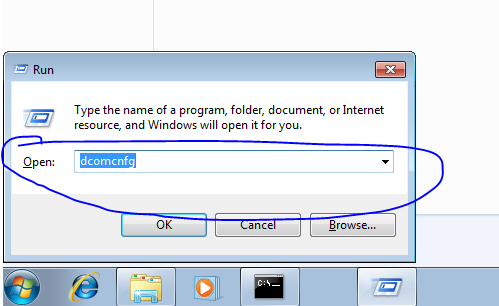
1. Go to Run (either press window key+r or click on start button) and type dcompcnfg.
2. A component service window will open. Expand the component service tree and then expand Computers tree. Under Computer you will see My Computer 

3. Right click on My Computer and then click on Properties, a dialogue window will appear (close main window to see this). Now click on the COM Security tab.


4. Now you will see two buttons Edit Limits  in two sections Access Permissions and Launch and Activation Permissions

5. Click on both buttons and add desired user to get access permissionss and launch and activation permissions and then tick Remote Access  in Access Permissions section and also tick to allow Remote Launch and Remote Activation in Launch and Activation Permissions section.
 

6. Now go to DCOM config tree menu in My Computer, Expand DCOM Config and search Windows Management and Instrumentation. 


7. Right click on this, select Properties. A new dialogue window will appear.  Click on Security tab. In access permission section click on Customisze  radio button  and then Edit button. Allow remote access check box for desired user.

Done everything to run WMIC command to run from remote system on this machine.

Now run following command using username and password


Saturday, 27 February 2016

Getting System Hardware Information Using Java (only windows)

Save your precious data
After searching on the web I found that there is no any pure Java code to get all system hardware information. Although we can get some system details using Java like processor, system architecture and the number of processors using the code below:-

System.out.println(System.getenv("PROCESSOR_IDENTIFIER")); System.out.println(System.getenv("PROCESSOR_ARCHITECTURE")); System.out.println(System.getenv("PROCESSOR_ARCHITEW6432")); System.out.println(System.getenv("NUMBER_OF_PROCESSORS"));

 But beyond this if we want all hardware associated to system like hard disk, RAM, CD/DVD W/ROM network card, BIOS, monitor and other. Then there is no direct code like mentioned above is not available. Either you have to use some third party API or windows tools to get system information.

Using other APIs is sometimes complex to use in our code and configuration is not easy. You can use API like SIGAR which I have heard most.
You can visit it here and can download from here.
But it is also limited.

 In the second approach, you can use windows tool in your Java program to get detailed information of system hardware, which is known as WMIC(Windows Management Instrumentation Command-line).
The sample code is given below to get some system hardware and software information.

String[][] commands = new String[][]
{
 {"CMD", "/C", "WMIC OS GET Installdate,SerialNumber"},
 //OS Installation date & Time, OS Serial Number
 {"CMD", "/C", "WMIC BASEBOARD GET SerialNumber"},
 // Motherboadrd Serial Number 
 {"CMD", "/C", "WMIC CPU GET ProcessorId"}, 
// Processor ID 
 {"CMD", "/C", "WMIC COMPUTERSYSTEM GET Name"},
// Computer Name
 {"CMD", "/C", "WMIC diskdrive GET Name, Manufacturer, Model, InterfaceType, MediaLoaded, MediaType"},
//HDD Details 
 {"CMD", "/C", "WMIC memphysical GET Manufacturer, Model, SerialNumber, MaxCapacity, MemoryDevices"}, 
 }; 

 for (int i = 0; i < commands.length; i++)
 {

 String[] com = commands[i];
 Process process = Runtime.getRuntime().exec(com);
 process.getOutputStream().close();
 //Closing output stream of the process
 System.out.println();
 String s = null;
 //Reading sucessful output of the command
 BufferedReader reader = new BufferedReader(new InputStreamReader(process.getInputStream())); 

 while ((s = reader.readLine()) != null) 
{ 
 System.out.print(s);
 }

 // Reading error if any 
 reader = new BufferedReader(new InputStreamReader(process.getErrorStream()));

 while ((s = reader.readLine()) != null)
 { 
 System.out.print(s); 
 }

 }

 Detailed about WMIC you can visit here.

Some other useful commands given below:-

baseboard get Manufacturer, Model, Name, PartNumber, slotlayout, serialnumber, poweredon

bios get name, version, serialnumber

bootconfig get BootDirectory, Caption, TempDirectory, Lastdrive

cdrom get Name, Drive, Volumename

computersystem get Name, domain, Manufacturer, Model, NumberofProcessors, PrimaryOwnerName,Username, Roles, totalphysicalmemory

cpu get Name, Caption, MaxClockSpeed, DeviceID, status

datafile where name='c:\\boot.ini' get Archive, FileSize, FileType, InstallDate, Readable, Writeable, System, Version

dcomapp get Name, AppID /format:list desktop get Name, ScreenSaverExecutable, ScreenSaverActive, Wallpaper/format:list

desktopmonitor get screenheight, screenwidth

diskdrive get Name, Manufacturer, Model, InterfaceType, MediaLoaded, MediaType

diskquota get User, Warninglimit, DiskSpaceUsed, QuotaVolume

environment get Description, VariableValue

fsdir where name='c:\\windows' get Archive, CreationDate, LastModified, Readable, Writeable, System, Hidden, Status

group get Caption, InstallDate, LocalAccount, Domain, SID, Status

idecontroller get Name, Manufacturer, DeviceID, Status

irq get Name, Status

job get Name, Owner, DaysOfMonth, DaysOfWeek, ElapsedTime, JobStatus, StartTime, Status

loadorder get Name, DriverEnabled, GroupOrder, Status

logicaldisk get Name, Compressed, Description, DriveType, FileSystem,FreeSpace, SupportsDiskQuotas, VolumeDirty, VolumeName

memcache get Name, BlockSize, Purpose, MaxCacheSize, Status

memlogical get AvailableVirtualMemory, TotalPageFileSpace,TotalPhysicalMemory, TotalVirtualMemory

memphysical get Manufacturer, Model, SerialNumber, MaxCapacity,MemoryDevices

netclient get Caption, Name, Manufacturer, Status

netlogin get Name, Fullname, ScriptPath, Profile, UserID, NumberOfLogons,PasswordAge, LogonServer, HomeDirectory, PrimaryGroupID

netprotocol get Caption, Description, GuaranteesSequencing,SupportsBroadcasting, SupportsEncryption, Status

netuse get Caption, DisplayType, LocalName, Name, ProviderName, Status

nic get AdapterType, AutoSense, Name, Installed, MACAddress,PNPDeviceID,PowerManagementSupported, Speed, StatusInfo

nicconfig get MACAddress, DefaultIPGateway, IPAddress, IPSubnet, DNSHostName, DNSDomain

nicconfig get MACAddress, IPAddress, DHCPEnabled, DHCPLeaseExpires, DHCPLeaseObtained, DHCPServer

nicconfig get MACAddress, IPAddress, DNSHostName, DNSDomain, DNSDomainSuffixSearchOrder, DNSEnabledForWINSResolution, DNSServerSearchOrder

nicconfig get MACAddress, IPAddress, WINSPrimaryServer, WINSSecondaryServer, WINSEnableLMHostsLookup, WINSHostLookupFile

ntdomain get Caption, ClientSiteName, DomainControllerAddress, DomainControllerName, Roles, Status

ntevent where (LogFile='system' and SourceName='W32Time') get Message, TimeGenerated

ntevent where (LogFile='system' and SourceName='W32Time' and Message like '%timesource%') get Message, TimeGenerated

ntevent where (LogFile='system' and SourceName='W32Time' and EventCode!='29') get TimeGenerated, EventCode, Message

onboarddevice get Description, DeviceType, Enabled, Status

os get Version, Caption, CountryCode, CSName, Description, InstallDate, SerialNumber, ServicePackMajorVersion, WindowsDirectory /format:list

os get CurrentTimeZone, FreePhysicalMemory, FreeVirtualMemory, LastBootUpTime, NumberofProcesses, NumberofUsers, Organization, RegisteredUser, Status

pagefile get Caption, CurrentUsage, Status, TempPageFile

pagefileset get Name, InitialSize, MaximumSize

partition get Caption, Size, PrimaryPartition, Status, Type

printer get DeviceID, DriverName, Hidden, Name, PortName, PowerManagementSupported, PrintJobDataType, VerticalResolution, Horizontalresolution

printjob get Description, Document, ElapsedTime, HostPrintQueue, JobID, JobStatus, Name, Notify, Owner, TimeSubmitted, TotalPages

process get Caption, CommandLine, Handle, HandleCount, PageFaults, PageFileUsage, PArentProcessId, ProcessId, ThreadCount

product get Description, InstallDate, Name, Vendor, Version

qfe get description, FixComments, HotFixID, InstalledBy, InstalledOn, ServicePackInEffect

quotasetting get Caption, DefaultLimit, Description, DefaultWarningLimit, SettingID, State

recoveros get AutoReboot, DebugFilePath, WriteDebugInfo, WriteToSystemLog

Registry get CurrentSize, MaximumSize, ProposedSize, Status

scsicontroller get Caption, DeviceID, Manufacturer, PNPDeviceID

server get ErrorsAccessPermissions, ErrorsGrantedAccess, ErrorsLogon, ErrorsSystem, FilesOpen, FileDirectorySearches

service get Name, Caption, State, ServiceType, StartMode, pathname

share get name, path, status

sounddev get Caption, DeviceID, PNPDeviceID, Manufacturer, status

startup get Caption, Location, Command sysaccount get Caption, Domain, Name, SID, SIDType, Status

sysdriver get Caption, Name, PathName, ServiceType, State, Status

systemenclosure get Caption, Height, Depth, Manufacturer, Model, SMBIOSAssetTag, AudibleAlarm, SecurityStatus, SecurityBreach, PoweredOn, NumberOfPowerCords

systemslot get Number, SlotDesignation, Status, SupportsHotPlug, Version, CurrentUsage, ConnectorPinout

tapedrive get Name, Capabilities, Compression, Description, MediaType, NeedsCleaning, Status, StatusInfo

timezone get Caption, Bias, DaylightBias, DaylightName, StandardName

useraccount get AccountType, Description, Domain, Disabled, LocalAccount, Lockout, PasswordChangeable, PasswordExpires, PasswordRequired, SID

memorychip get BankLabel, Capacity, Caption, CreationClassName, DataWidth, Description, Devicelocator, FormFactor, HotSwappable, InstallDate, InterleaveDataDepth, InterleavePosition, Manufacturer, MemoryType, Model, Name, OtherIdentifyingInfo, PartNumber, PositionInRow, PoweredOn, Removable, Replaceable,SerialNumber, SKU, Speed, Status, Tag, TotalWidth, TypeDetail, Version

Thursday, 11 February 2016

Data types in C and its size

My title
Data types in C and its size
C89 -[those features of C defined by the original, 1989 ANSI standard for C (commonly referred to as C89)]- defines five foundational data types
1. Character declared as char
2. Integer declared as int
3. Floating-point decalred as float
5. Double floating point declared as double
4. Valueless declared as void
Other several data types arederived from these basic data types.
Now, about the size and range of these data types we have heared many different things. Some people says that integer takes 2 bytes, some says it takes 4 bytes. It is true but not clear.
“Most important, the size and range of these data types may vary among processor types and compilers.” However in all case char is 1 byte.
The size of an int is generally same as the word (The memory stores binary information in group of bits called words ) length of the execution environment of program.
For most 16-bit environments such as DOS, an int is 16 bits (2 bytes). For most 32-bit environments an int is 32 bits (4 bytes).
So, you can not be sure about the size of an integer if your program is going to be executed on the widest range of environments.
It is important to understand that C stipulates only the minimal range of each data type, not its size
in bytes.
Valid data type combinations supported by C, along with their minimal ranges and typical bit widths are given below. Remember, the table shows the minimum range that these types will have, not their typical range. For example, on computers that use two's complement arithmetic (which is nearly all), an integer will have a range of at least 32,767 to –32,768.
Type                               Typical Size in Bits                                              Minimal Range
char                                        8                                                                       –127 to 127
unsigned char                        8                                                                       0 to 255
signed char                            8                                                                       –127 to 127
int                                     16 or 32                                                                 –32,767 to 32,767
unsigned int                     16 or 32                                                                 0 to 65,535
signed int                         16 or 32                                                                Same as int
short int                               16                                                                     –32,767 to 32,767
unsigned short int               16                                                                      0 to 65,535
signed short int                   16                                                                     Same as short int
long int                               32                                                            –2,147,483,647 to 2,147,483,647
long long int                       64                                                    –(263 – 1) to 263 – 1 (Added by C99)
signed long int                    32                                                                      Same as long int
unsigned long int                32                                                                   0 to 4,294,967,295
unsigned long long int        64                                                       264 – 1 (Added by C99)
float                                    32                                             1E–37 to 1E+37 with six digits of precision
double                                 64                                            1E–37 to 1E+37 with ten digits of precision
long double                         80                                             1E–37 to 1E+37 with ten digits of precision

Reference:-C: The Complete Reference 4th Edition by Herbert Schildt

Thursday, 28 January 2016

Grub rescue in Ubuntu 14.04 (LTS)

My title
If you have a multi-boot machine with Ubuntu 14.04, and mistakenly you have deleted the any partition. Normally your boot loader (Grub generally) goes into rescue mode. And you can not boot your system for any other OS installed on your system.

When you boot your system you get a black screen with grub rescue command prompt like grub rescue> .

Don't worry if you get screen like this.

Just type

grub rescue > ls
output will be like this
(hd0) (hd0,msdos5) (hd0,msdos3) (hd0,msdos2) (hd0,msdos1) (hd1) (hd1,msdos1)
then type
grub rescue > ls (hd0,msdos1)
output may be
Unknown filesystem

try above command with all partitions until you get output like 
file system is ext4 or any other valid linux file type

grub rescue > ls (hd0,msdos2) # let's assume this is the linux partition
grub rescue > set root=(hd0,msdos2)
grub rescue > set prefix=(hd0,msdos2)/boot/grub 
grub rescue > insmod normal 
grub rescue > normal

Noe you system will boot in normal grub boot mode. You will have to run these commands on every boot up until you repair or reinstall your grub boot loader.

Sunday, 18 October 2015

Customize Textbox, List/Menu, Button or Div border style

My title
You can customize Textbox, List/Menu or Div using CSS.

All input can be rounded and with border color:

CSS:-

input{
border-radius: 8px;
border-color: #98bf21;
}

HTML:-

<input type="text" name="username" placeholder="Enter Password" required />

<input type="submit" name="Submit" value="Login" style="width:150px;"/>

 <select name="select2" id="select2">
          <option>Select Scheduled Month</option>
          <option>January</option>
          <option>February</option>
          <option>March</option>
          <option>April</option>
          <option>May</option>
          <option>June</option>
          <option>July</option>
          <option>August</option>
          <option>September</option>
          <option>October</option>
          <option>November</option>
          <option>December</option>
        </select>


Output:-


Thursday, 27 August 2015

Customize your Ubuntu/Linux Environment using "CompizConfig Settings Manager,

My title

Compiz is a compositing manager, which means that it enhances the overall user interaction by adding fancy effects to your windows, from drop shadows to awesome desktop effects like the Desktop Cube or the Expo view.

Compiz can also be a window manager, which means that it is the software between you and your desktop apps. It enables you to move or resize windows, to switch workspaces, to switch windows easily (using alt-tab or so), and so on.

How to install

1. you can download from launchpad website or www.compiz.org.


                                                                             OR


Remember this package depends on :-

Package relationships
So your system should have these packages before installing this package.

2. Then install deb package using terminal


 sudo dpkg -i compizconfig-settings-manager_0.9.11+14.04.20140409-0ubuntu1_all.deb


3 All done.

4. Now use it very carefully otherwise you can dump your desktop.


You will also need to install compiz plugins. Run the following command -

sudo apt-get install compiz compizconfig-settings-manager compiz-plugins

Good Luck !!!!

References:-
http://askubuntu.com/questions/449651/how-do-i-enable-wobbly-windows
https://launchpad.net/ubuntu/trusty/+package/compizconfig-settings-manager
http://www.compiz.org/

Change image source dynamically on hyperlink

 Changing image source dynamically using JQuery. Here in this example I have created there hyperlink and stored all images in the same folde...