Thursday, 12 October 2017

Get MAC address using Java


Getting MAC address of any system is very simple. But how can we get the MAC address programmatically  using Java ? 

Let see, how it is possible in Java ?


try{
           String IP  =InetAddress.getLocalHost().getHostAddress();//get the system ip address
         //System.out.print(IP);
          String hostname=InetAddress.getLocalHost().getHostName();//get the system name
        
        //get mac addrress
        
        InetAddress inet=InetAddress.getLocalHost();
        NetworkInterface network = NetworkInterface.getByInetAddress(inet);
byte[] mac = network.getHardwareAddress();
//System.out.print("Current MAC address : ");
StringBuilder sb = new StringBuilder();
for (int i = 0; i < mac.length; i++) {
sb.append(String.format("%02X%s", mac[i], (i < mac.length - 1) ? "-" : ""));
}
String mac1=sb.toString();// Get the Mac Address in a string
}
catch(Exception e)
{

}

Friday, 6 October 2017

Getting MAC address of any device in LAN from Ubuntu/Linux.

Getting MAC Address of any system from Ubuntu is very easy from Linux/Ubuntu. In some cases it is very hard to find any system when it does not ping and is on same network. To get MAC address of any device it should be turned on and should be on same network.

The ARP Scan Tool (also called ARP Sweep or MAC Scanner) is a great tool to find MAC address of any device in LAN.

So, you require to install arp-scan tool in your system. You can install it from terminal by just typing -

sudo apt-get install arp-scan

After installing arp-scan you will have to run it from terminal to find MAC address of any device. 

sudo arp-scan 172.16.16.51


You can also find the MAC address of multiple PCs at same time using arp-scan tool. All PCs must be connected through LAN.


To find MAC address of multiple PCs, just type in terminal -

sudo arp-scan <starting ip address>-<ending ip address>

for example-

arp-scan 172.16.16.101-172.16.16.185

above command will give the MAC address of all PCs having IP address in between given range in command, also sure that all PCs must be turn on.

You can find many more options that you can do it from arp-scan.

Thursday, 5 October 2017

Remotely turn on a Windows PC from Ubuntu/Linux

If you want to turn on a Windows PC from Ubuntu/Linux machine, you are required to first prepare the target machine to capable on wake on LAN.

Prerequisite:-

1. A target Windows machine configured to wake on lan.
2. A updated Linux/Ubuntu Machine.
3. MAC address of traget machine.
4. A LAN, that connect both machines.


How to configure a Windows PC to wake on LAN ? Read this blog.

After making your target PC to wake on LAN, you need a Ubuntu/Linux machine from where you can turn on your machine. As well as you also required a Linux/Ubuntu package to turn on a machine through a LAN.

There are many tools are available for Linux/Ubuntu to turn on any PC on wake on LAN. Some are -

1. etherwake
2. wakeonlan
3. powerwake

As well as a GTK tool is also available

gWakeOnLan

I have used wakeonlan on Ubuntu 16.04 and 14.04.

Open your terminal and type

wakeonlan <mac address of your target machine>

like

wakeonlan 00:00:cc:dd:cc:aa


After running above command your traget PC will be turned on successfully, if it is configured properely.

Wednesday, 4 October 2017

How to configure a Windows PC to Wake on LAN.

How to turn on a computer sytem remotely or from anywhere in LAN is a very good question to ask any comuter techy. So, is it possible to do so? Answer is defenetely, yes. In modern computer system it is possible to start any system from remote location (in LAN).

Let's see, how it is possible ?

Note:- I have tested it on Windows 7 professional and Windows 10 machine as a target (client) and Ubuntu 16.04 and Ubuntu 14.04 as source (server).


Configuration in target machine-

To start any system from remotely, its network card or network adapter should be capable to receive wake up packet and respond. If wake on LAN facility is available in network adapter, then you should check that whether it is enabled or not ?
To check above facility, you required to go into your system BIOS settings and enable the Wake up on LAN. You will get this option normally in Power menu, like-


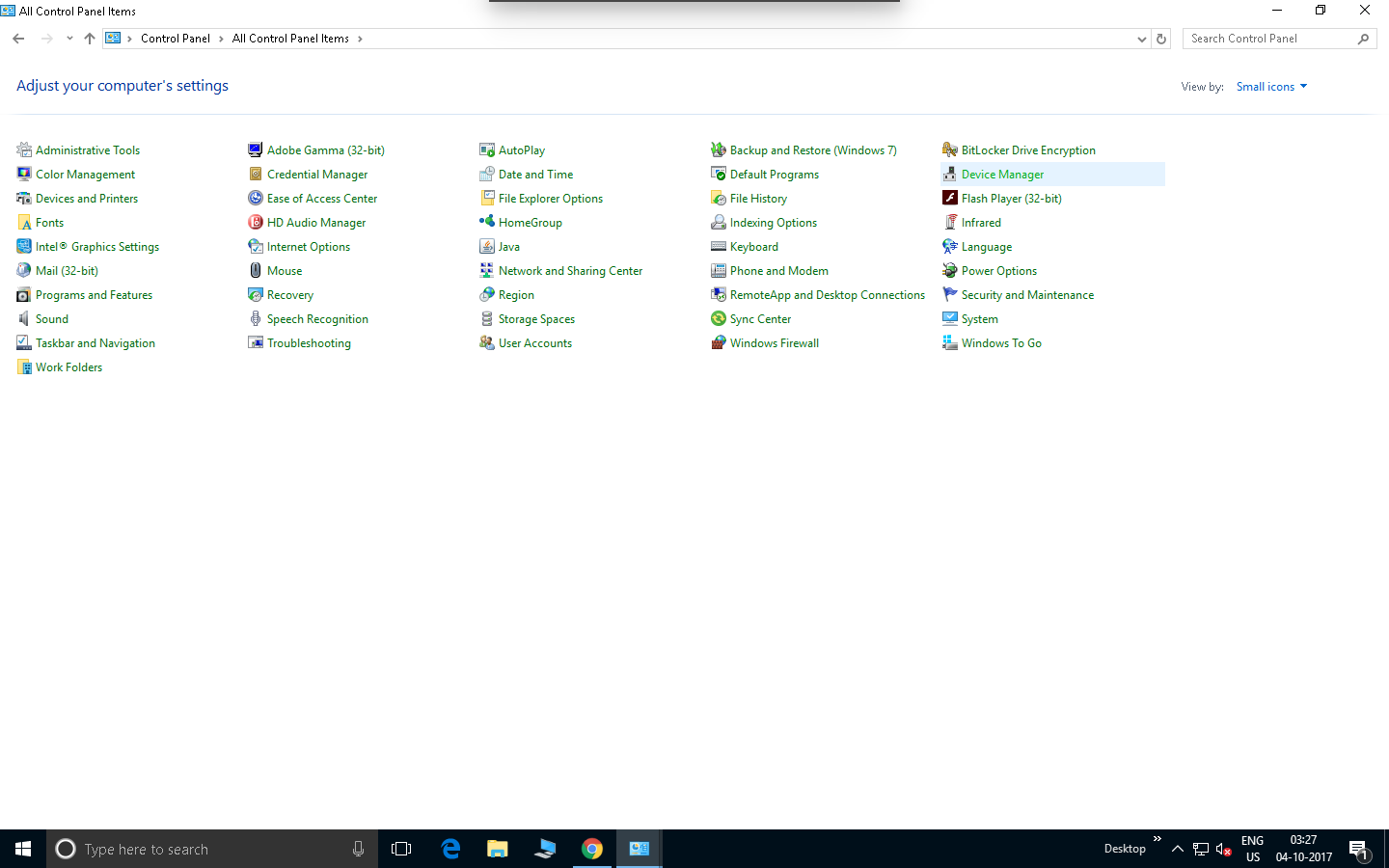
As well as you are also required to do some settings in your operting system too. You need to open the Device Manager. You can found device manager 

a -  In "Control Panel "


b -  By just typing in "Cartona" search box 


c - By right clicking on "My Computer" or "This PC" icon and click on "Manage" or "Properties"


After getting "device manager" double click on it. You will get a list in central pane, find "Network Adapters" in this list and then double click on it. It will be expanded and you will get your NIC card here. Right click on it and then click on "Properties"


You will get NIC properties window. Then click on "Advanced" tab and enable the "Wake on magic packet". After that click on "Power Management" tab and tick the checkbox for  “Allow this device to wake the computer”  and then click Ok.


Now your PC is prepared for turn on from remote location in LAN.

Monday, 2 October 2017

Why Blackberry phones quitted ?

BlackBerry was once the phone of choice for Wall Street traders, politicians and celebrities, thanks in part to its well-regarded security system. President Obama was spotted with a BlackBerry. So was Kim Kardashian West. But the company was too late to the touchscreen game, and customers left in droves for Apple's(AAPL, Tech30) iPhone, Samsung's (SSNLF) Galaxy and other devices running on Google's(GOOGL, Tech30) Android system. Even Microsoft (MSFT, Tech30) has moved ahead of BlackBerry with its Windows Phones.

Read some key facts to decline in Blackberry users :-

1. Blackberry was only a communication system

The popularity of BlackBerry Messenger and its high-tech email system made its phones a smash hit among young users and professionals alike, but Apple's iPhone and Google's Android software, with millions of apps and full touchscreens, rendered them obsolete.

Blackberry saw mobile phones as just communication devices when ios and android turned mobile phones into entertainment hubs. It didn't produce touch screen mobiles until its too late. It has very less number of apps when compared to ios/android. Finally, lack of progressing in software and wrong marketing strategy brought down blackberry's popularity.

The company, which is famed for its "Qwerty" keyboard mobile phones that were the choice handset for professionals, has been struggling to keep up with market leaders Apple and Samsung as the world has moved to touchscreens.

2. Support of popular application was stopped for Blackberry.

BlackBerry suffered the embarrassment of having the world's most popular messaging app – WhatsApp – drop support for its BlackBerry OS earlier this year. Facebook and its Messenger app soon followed suit and stopped working on BlackBerry OS, including the most recent – BB10, by the end of the year.

3. App support was low.

No developer wants to develop for BlackBerry.
It used to be a badge of honor to be able to carry BlackBerrys and now it’s almost a shame,” he
said. “People look at it like it’s a dinosaur, a museum piece.”

4. Some technical issues that distract the users to quit the Blackberry

On social media sites, some BlackBerry users said they were so upset about the outage -- the largest in the company's history -- that they were switching to Apple iOS and Google Android devices. And customer satisfaction with BlackBerry already was low.

This is not to say that Androids and iPhones never experience network outages. But they wouldn't be global. And they would be the responsibility of a particular wireless carrier -- AT&T, Sprint, Verizon and T-Mobile -- or a particular messaging system, like Gmail, Hotmail or iMessage, Apple's new in-house messaging service. Not the maker of the phone.

"All the stuff goes through them for some form or fashion," Nan Palmero, a writer for the site BlackBerryCool.com, said of the way BlackBerry handles messages and e-mail. That makes it possible, he said, for the global BlackBerry network to crash, which wouldn't be the case for iPhones or Androids.

There's no such thing as a good time for RIM to leave half its customers without messaging or internet. But the problem's been getting worse, not better—on the day that Apple makes its strongest case for total dominance.

RIM's biggest advantage was its push email and BlackBerry Messenger service. Now just about every smartphone platform has push email (in some form) and Apple's new iMessage is gunning for BBM. BlackBerry OS 7 is already behind, and it's not even out yet. Just look at the voice control and navigation built into Android.

See also some strories about Blackberry in figures to quit.

As a result, the loss-making business said it is going to focus on creating software for mobile phones, rather than the devices themselves. Instead, it will outsource the brand to other manufacturers.


What Blackberry report says about quitting the smartphone manufacturing.

CEO John Chen announced the new strategy as part of the Canadian company's Fiscal Q2
2017 report. As Chen explained in the report:

"Under this strategy, we are focusing on software development, including security and applications. The company plans to end all internal hardware development and will outsource that function to partners. This allows us to reduce capital requirements and enhance
return on invested capital."

It has no stated plans for another BB10 phone and is accelerating a pivot to handsets running Google’s Android.

References:-
http://www.telegraph.co.uk/technology/2016/09/28/blackberry-to-stop-making-phones/
https://www.forbes.com/sites/ewanspence/2016/09/28/blackberry-exits-smartphone-manufacturing/#7aa541c769b7
http://money.cnn.com/2016/09/28/technology/blackberry-outsource-phones/index.html
http://edition.cnn.com/2011/10/13/tech/mobile/blackberry-servers-android-iphone/index.html

Wednesday, 27 September 2017

Validation on the Select input type element of a form in HTML5

Validation is an important part of any web application or website. In HTML5 validation is very simple then earlier. HTML5 provides very simple and efficient way to validate any form.

In HTML5 "required" is the keyword to put in any form element to check, whether it has been chosen/selected/entered or not.

For validating a input type, we just have to use "required" keyword to check null value. See below-

   <input name="arvind" type="text"  required>


It is very simple in text input type. But it is not so in select input type.

Let see, how we implement in select in put type. Mechanism is similar but it require some more manipulation in select element.

To use it in select input type, we have to put the some  value in all option of select input and first/top option value should be blank. 

Let see below-

 <select name="dept" required class="form-control">
             <option value="">Select Department</option>
             <option value="Bio-Informatics">Bio-Informatics</option>
              <option value="Bioscience & Biotechnology">Bioscience & Biotechnology</option>
              <option value="Chemical Engineering">Chemical Engineering</option>

  </select>


Enjoy happy coding.

Wednesday, 20 September 2017

How to install Webmin tool in Ubuntu 16.04

Webmin is a web-based interface for system administration for Unix. Using any modern web browser, you can setup user accounts, Apache, DNS, file sharing and much more. Webmin removes the need to manually edit Unix configuration files like /etc/passwd, and lets you manage a system from the console or remotely. 


Note: I have used Ubuntu 16.04 running on Real Machine to run all of the experiments
Add the Webmin repository so that You can easily install and update Webmin using our package manager. I do this by adding the repository to the /etc/apt/sources.list file.
Type command in terminal -

sudo nano /etc/apt/sources.list

You will get sources.list file in nano editor

and then add this line to the bottom of the file to add the new repository:
deb http://download.webmin.com/download/repository sarge contrib


then pressed ctrl+o to save the file and ctrl+w to exit.
Now add the Webmin PGP key so that your system will trust the new repository:
 run this command on terminal-
wget http://www.webmin.com/jcameron-key.asc

then
sudo apt-key add jcameron-key.asc

after getting ok signal from command I updated the list of repository to include Webmin repositery
sudo apt-get update
Then I Installed the Webmin using command in terminal
sudo apt-get install webmin

after using this command I again stuck on previously faced dependencies problem.
as suggested by system I used command-
sudo apt-get -f install

Finally I installed the Webmin as confirmed by terminal.

Now I tried to open it on browser I got SSL error

(Sorry to not capture the screen) add the exception to the browser and  get the login screen


After login I got the dashboard like-


Now all you system administration is on web based.

Change image source dynamically on hyperlink

 Changing image source dynamically using JQuery. Here in this example I have created there hyperlink and stored all images in the same folde...